Game Features 1
Classes
Game Features 1 Overview
There are two main components to this Game Features task. In the first part, you will be implementing various physics-related functionality to the game engine. In the second part, you'll be implementing functionality that will make the Snake game functional.
This document is split into multiple parts for organization - you do not necessarily need to fully complete the Physics Engine functionality before you begin Snake. However, future tasks will likely build extensively off the physics engine, so it's highly suggested you implement this first.
Overview
You will continue to build functionality for the Game Engine in this component of the task. This will be done on top of the code written for the previous task; you should not reclone or remove said code for this task or any future Game Features components.
For this portion, you will be writing code in the following classes which already exist:
-
PhysicsEngine, located in theapp.gameengine.model.physicspackage. -
Wall, located in theapp.games.commonobjectspackage.
The Game Engine
In this task, you will continue to add feature to the game engine project that you started in the previous task.
The Coordinate System
The coordinate system use for computer graphics might be different than you're used to. We'll use the standard coordinate system that is typically used in video games (and anything involving rendering to a screen).
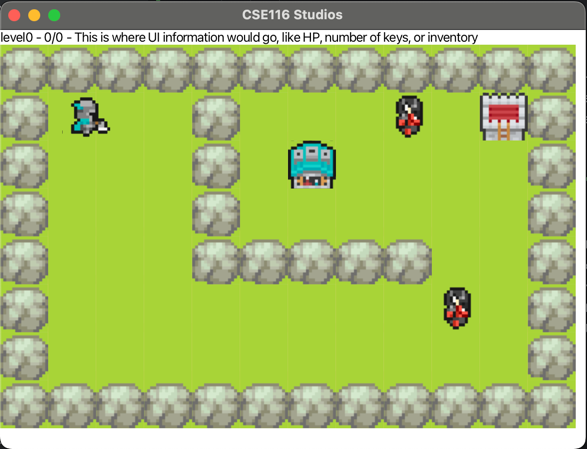
The origin of the system is at the top-left of the screen/window/level with positive x going right and positive y going down. This image shows the same information as the one above, but with the coordinate system labeling all the tiles in the game. You can see that "G" (The goal) is at location (6, 2).
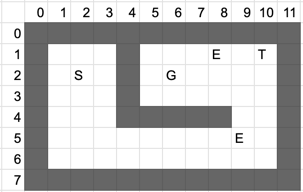
Each object within the game has several important properties to consider, namely a location and a hitbox, which has its own location and dimensions. These quantities are each represented as 2-dimensional vectors (x, y). All objects and hitboxes are rectangles, and their location is the location of their upper left corner. Their dimensions are the width and height of the rectangle. For example, the goal (G on the grid above) has a location of (6, 2), since that's the location of its upper-left corner, and it has dimensions (1, 1) since it's exactly 1 tile in size. Locations and dimensions do not have to be whole numbers.

Object locations and dimensions also do not necessarily have to be aligned with the visuals of that object. In the image above, the green dot represents the location of that object, the blue outline represents the size of the sprite image that is being rendered for that object, and the red outline represents the size of its hitbox. Having a hitbox smaller than the graphical sprite allows for more precise physics and collision, but means that extra care has to be taken when dealing with those properties. Pressing F4 in game shows overlays of each object's hitbox, which can be helpful for debugging.
Specification
You should read through all the following sections before you begin to implement the methods from the specification. Note that you will not receive feedback on the correctness of these methods until you've completed the testing component of this task (see the "Autolab Feedback" section for more details). However, you must at least create every class/method from this specification to receive feedback. You can "stub out" these methods by having them always return a fixed value, but they must exist so the grading code, and your tests, can compile and run.
Each of the methods you implement will have an associated point count that you will earn upon passing our tests for that method. Partially implemented methods may result in some partial credit being earned, depending on the method.
For this portion of the Game Features component for this task, you will implement the following functionality:
-
Implement the following methods in the
PhysicsEngineclass:-
updateObject(10 points)-
Complete the given
updateObjectmethod. This method should update the location of theDynamicGameObjectbased on the velocity and amount of elapsed time. -
You should use the respective getters and setters in the
DynamicGameObjectclass to achieve this functionality, namelygetVelocity,getLocation, andsetLocation. These methods are already provided for you. -
Note that change in position for each direction can be calculated as the product of that
direction's velocity and the change in time. You can access the X and Y components of the
velocity (and any other vector) using the
getXandgetYmethods on theVector2Dobject returned bygetVelocity.
-
Complete the given
-
getOverlap(10 points)-
Complete the given
getOverlapmethod. This method should return adoublerepresenting the minimum overlapping distance of the twoHitboxobjects from the parameters. -
To be precise, consider that one hitbox must be moved in one of the four cardinal directions
(up, down, left, or right) such that the two hitboxes are no longer overlapping. The distance
returned by this method should be the smallest of those four distances. This is very similar to
the logic for the
Wall.collideWithDynamicObjectmethod, so referring to those descriptions and images may be helpful. -
While you do not need to fully understand the exact implementation of the
Hitbox, note the following:-
You can access the coordinates of the top-left location of the
Hitboxusing thegetLocationmethod, which returns aVector2Dcontaining the x and y coordinate of said location. -
You can access the size of the
Hitboxusing thegetDimensionsmethod, which returns aVector2Dcontaining the width (in the x-component) and height (in the y-component) of the Hitbox. - With this information, you are able to calculate the location of all four corners of the Hitbox.
-
You can access the coordinates of the top-left location of the
-
The double that you return should be the minimum overlapping distance of the two
Hitboxobjects. This means you must calculate the amount the two hitboxes are overlapping in both the x and y direction, then return the smaller of the two. -
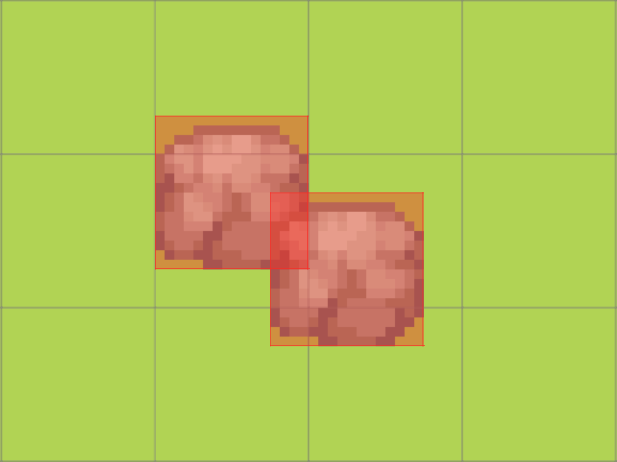
In this example, the Walls are overlapping by 0.25 in the x-direction and 0.5 in the y-direction. CallinggetOverlapon these Walls' hitboxes would return 0.25. - You are provided tests for this method, and it is suggested you run them as you complete your implementation. It is also suggested that you sketch out the logic for this method before you start writing code.
- If the two hitboxes are not overlapping at all, this method is not defined. You can assume that this method would only be called on two objects that are already overlapping.
-
Complete the given
-
detectCollision(5 points)-
Complete the given
detectCollisionmethod. This method should return abooleanthat is true if the two Hitboxes are colliding and false otherwise. - Two hitboxes are considered colliding if they are overlapping by some amount strictly greater than 0. That is, if they just share an edge, that is not considered a collision.
-
All the Hitbox information from
getOverlapapplies here as well. In the same example, callingdetectCollisionon those two Walls would return true, as they are colliding by 0.25 which is greater than 0.
-
Complete the given
-
-
Implement the following method in the
Wallclass:-
collideWithDynamicObject(25 points)-
Complete the given
collideWithDynamicObjectmethod. This method should adjust the location of theDynamicGameObjectpassed in the parameter to ensure that they are no longer overlapping, and zero the velocity in that direction. - This adjustment should be made based on whichever direction has the least amount of overlap.
-
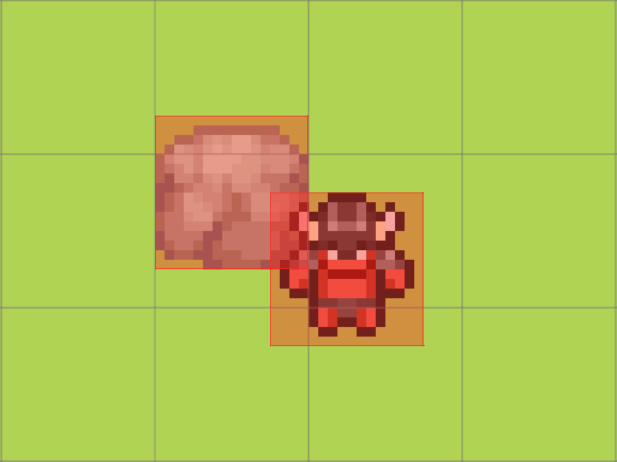
In this example, the Demon's position would be incremented by 0.25 in the x-direction and the y position would stay the same. This would place the Demon directly next to the Wall's right side. It's velocity in the x-direction would be set to 0, and it's velocity in the y-direction would be unchanged. -
This method should only modify the location and velocity of the
DynamicGameObject. All state in theWallshould stay the same. -
Determining the overlap for this method is done in the same fashion as the
PhysicsEngine.getOverlapmethod. Thus, you should calculate the overlap based on theWall's andDynamicGameObject's hitboxes, which can be obtained with thegetHitboxmethod. You should be able to reuse much of the same logic for this method. -
When you update the object's position, you should do so based on the object's actual location
rather than its hitbox's location (e.g. if you need to move the object 0.5 to the left, you
would call
setLocationwithotherObject.getLocation().getX() - 0.5rather thanotherObject.getHitbox().getLocation().getX() - 0.5. Note that this is only for the position update, and you should still use the hitbox's position to calculate the amount to move). - You are provided tests for this method that you should run throughout your implementation. Refer to the "Overview" section in the "Physics Engine" card if you are missing these tests.
-
Complete the given
-
Testing
You are given tests for the PhysicsEngine.getOverlap and Wall.collideWithDynamicObject methods.
You should run and debug using these tests as you implement these methods to guide you.
You are not given tests for the remaining methods. You are encouraging to write more tests using the same format as these given tests.
Autolab Feedback
For this section, your code will be run against our tests for correctness. For each feature you successfully pass, you will earn some number of points. Completing all the methods in this section will earn you 50 points.
Overview
For this portion of this task, you will be implementing functionality in the
SnakeLevel class (from the app.games.snake package) such that the Snake game is fully
functional. You can access the Snake game by changing the GAME constant in
app.Configuration to "Snake".
Each of the methods you implement will have an associated point count that you will earn upon passing our tests for that method. Partially implemented methods may result in some partial credit being earned, depending on the method.
You don't need to understand all of the internal Snake code; however, you should expect to read and understand some of the internal Javadoc comments while completing this task. Not all background information will be provided in this document.
Programming Requirements
In the
SnakeLevel class, implement the following methods:
-
wallOffBoundary(10 points)-
When this method is called, it will surround the level with
SnakeWallobjects. - These walls should each be aligned to a single, whole-numbered tile.
-
These walls should surround the level. The level consists of the space between (inclusive) [0,
width-1] in the x-direction, [0, height-1] in the y-direction.
- For example, a 2x2 level's top wall will span from (-1, -1) to (2, -1)
-
All four sides of the level should be surrounded by
SnakeWalls. Adding aSnakeWallto the level can be done by calling theaddStaticObjectmethod. - You may find it helpful to draw out examples to determine where these walls should lie.
-
When this method is called, it will surround the level with
-
spawnFood(10 points)-
When this method is called, one
SnakeFoodshould be added to the level, as well as the ArrayList namedfoodin theSnakeLevelclass. As with the previous method, you can add aSnakeFoodto the level by callingaddStaticObject. -
The location of this
SnakeFoodshould be at a random tile-aligned coordinate, with the following restrictions:-
It cannot be spawned anywhere a
SnakeBodyobject from thetailArrayList is currently occupying. - It cannot be spawned at the player's location.
-
It cannot be spawned anywhere a
SnakeFoodobject from thefoodArrayList is currently occupying. - It must be spawned within the confines of the level.
-
It cannot be spawned anywhere a
-
Any random number generation used for this method must utilize the methods in the
Randomizerclass from theapp.gameengine.utilspackage.-
These methods are extensively documented. You should use the
randomIntVector2Dmethod that takes in two parameters.
-
These methods are extensively documented. You should use the
-
If the head and tail occupy every tile of the level, this method should call the
advanceLevelmethod on theGameobject stored internally in this class (this object can be accessed withthis.game) and return immediately, doing nothing else. - If there is no room to spawn food (i.e. the entire level is taken up by the head, tails, and other food), the method should return immediately and do nothing else.
-
When this method is called, one
-
lengthenSnake(10 points)-
When this method is called, new
SnakeBodyobjects will be added to thetailArrayList, as well as the level viaaddStaticObject. The number ofSnakeBodys to be added to the list will be dependent on the value of thelengthIncreaseinstance variable. -
For each new
SnakeBodyobject, the location of this object should be decided as follows:-
If the
tailArrayList is empty, the newSnakeBodyobject should be positioned such that it is directly behind the head (which is returned bythis.getPlayer()). This can be determined by looking at the head's location and orientation vectors. - The orientation vector will always be one of {(1, 0), (0, 1), (-1, 0), (0, -1)}.
-
If the
tailArrayList is not empty, the newSnakeBodyobject should be positioned such that it shares the location with the firstSnakeBodyobject in thetailArrayList(the object at index 0).
-
If the
-
Whenever a new
SnakeBodyis added to thetailArrayListin this method, it should be added to the front of the ArrayList (prepended) rather than the end. Recall that callingadd()with only one parameter defaults to adding to the end of the list (appending).
-
When this method is called, new
-
spawnSnake(10 points)-
This method will add new
SnakeBodyobjects to the level in the same manner aslengthenSnake, but the number to be added should be based off of the value of thestartingLengthinstance variable instead. Note that you should add newSnakeBodyobjects to both thetailArrayList and to the level viaaddStaticObject. -
Note that the
startingLengthis based off of the total length of the snake including the head, rather than just the length of the tail. AddingstartingLengthnewSnakeBodyelements will result in an incorrect length. -
You can assume the
tailArrayListis empty initially when this method is called.
-
This method will add new
-
moveSnake(10 points)-
The purpose of this method is to move the head and tail of the snake forward, and there
are a few ways in which this can be accomplished. First, you can move every element in the tail forward
by one, such that the
SnakeBodyobject at index 0 is now at the location that theSnakeBodyobject at index 1 previously occupied and so on. TheSnakeBodyat the last index of thetailArrayList should have what was previously the location of the Player. -
Alternatively, you may notice that every
SnakeBodyobject stays in place except for the last. If you choose, you can only modify the location of that final segment to the proper place directly behind the player. - Your code must handle the case where the tail is empty, and there is nothing to be moved.
-
Regardless of the size of the
tailArrayList, the Player's location should then be incremented by the Player's orientation. Remember that the Player can be accessed withthis.getPlayer().-
There are many extensively-documented static methods in the
Vector2Dclass that you may find helpful for your implementation of any methods that require arithmetic operations on Vector2D objects. However, using these methods is not necessary.
-
There are many extensively-documented static methods in the
-
Example: If the Player's location is (4, 0), orientation is (0, 1), and
tailcontainsSnakeBodys with locations [(0,0), (1, 0), (2, 0), (3, 0)], the Player's location would be set to (4, 1) andtailwill containSnakeBodys with locations [(1, 0), (2, 0), (3, 0), (4, 0)]. Repeating this (assuming orientation is unchanged) would result in the Player's location being set to (4, 2) andtailcontainingSnakeBodys with locations [(2, 0), (3, 0), (4, 0), (4, 1)]. -
If you wish to accomplish this by adding or removing new instances of
SnakeBody, ensure that added objects are added to the level viaaddStaticObjectas well as thetailArrayList. Removed objects must be removed from thetailArrayList and have thedestroy()method called on them. This method can (and probably should) be implemented without adding or removingSnakeBodyobjects.
-
The purpose of this method is to move the head and tail of the snake forward, and there
are a few ways in which this can be accomplished. First, you can move every element in the tail forward
by one, such that the
Testing
You are not provided tests for any of these methods. You are encouraged to write your own if need be. You are also strongly encouraged to run the game to check your functionality.
Note: If you cloned the Game Engine repo early, you may have a test named testGetOverlapWithNoOverlap.
If so, you should remove the test as it tests undefined behavior in the getOverlap method. Additionally,
you may find that the game doesn't end when the snake collides with itself. If so, you should either pull from
the GameEngine repo to update your project, or replace the file src/main/java/app/games/snake/SnakeGame.java
with
this newer version.
Autolab Feedback
For this section, your code will be run against our tests for correctness. For each feature you successfully pass, you will earn some number of points. Completing all the methods in this section will earn you 50 points.